Thank you for purchasing NM Collector
Software
Getting Started
With the USB flash drive
you can run the software on any computer you want without installing it on any
computer. �
|
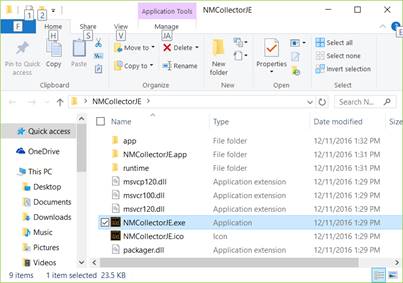
To Start NM Collector Software in Windows Run NMCollectorJE.exe
|
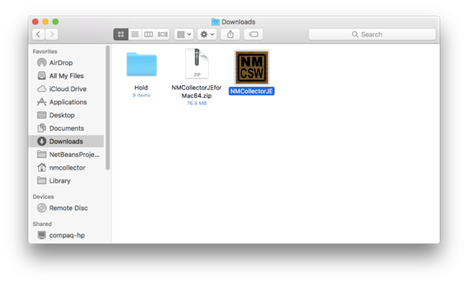
To Start NM Collector Software on a Mac Run NMCollectorJE.app
This screen capture
assumes the app is still in downloads � move it to a new location first by dragging and dropping it |
|
Recommended Best Practice: It is best to copy the software from the USB flash drive to your
main computer's hard drive and run it from there rather than directly from
the USB flash drive. It will run substantially faster from your hard drive
than from the USB flash drive. See �How To� videos for a
tutorial on How to copy NM Collector Software from your USB flash drive to
your desktop computer and how to copy your database from one location to
another. To avoid data loss,
please use proper procedure to remove USB Flash Drive from computer! |
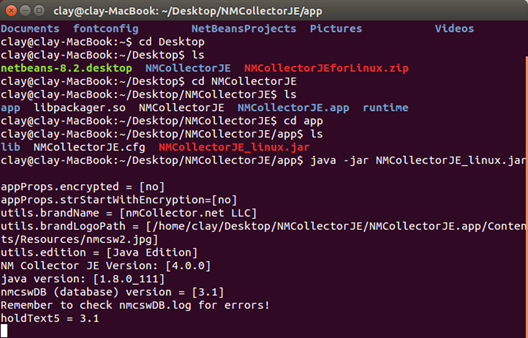
To Start NM Collector Software in Linux Java �jar NMCollectorJE_linux.jar
|
For More
Help and Guidance please note the following
�
Please
install bar code fonts from the BarCodeFonts folder
in the distribution
�
Printable
User Manual:� Please see Support Home Page�����������
�
Support Home
Page:���� http://www.nmcollectorsoftware.com/support/
�
Examples:������������������� http://www.nmcollectorsoftware.com/examples/
�
�How To�
Videos:��������� http://www.nmcollectorsoftware.com/videos/